

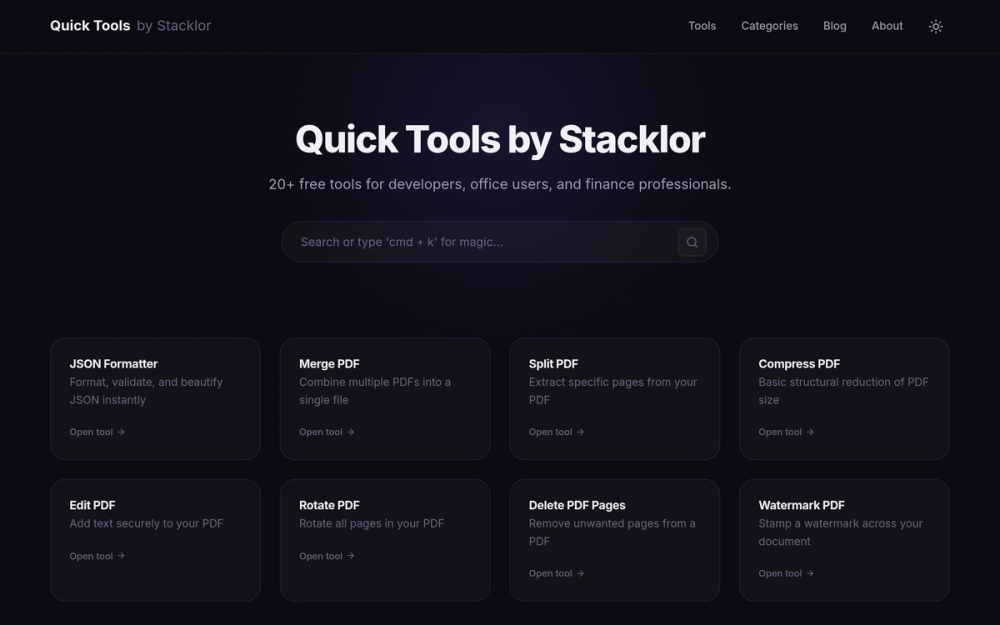
What is Quick Tools by Stacklor?
Quick Tools by Stacklor is a browser-based collection of over 20 free developer, PDF, office, finance, text, converter, generator, and utility tools that run directly in the browser without sign-up. The platform groups its tools by category, covering tasks such as JSON formatting, PDF manipulation, regex testing, JWT decoding, and financial calculations in one place.
Key Features
- JSON Formatter: Formats, validates, and beautifies JSON instantly, helping developers inspect and clean up structured data without leaving the browser.
- PDF Toolkit: Includes Merge PDF, Split PDF, Compress PDF, Edit PDF, Rotate PDF, Delete PDF Pages, and Watermark PDF tools for combining, extracting, resizing, annotating, and reorganizing documents.
- Developer Utilities: A set of 12 developer tools that covers formatting JSON, testing regex, minifying CSS, converting XML, checking an IP address, and decoding JWT.
- Office Tools: Four productivity tools for counting words, merging PDFs, compressing images, and generating QR codes.
- Finance Calculators: Six calculators for EMI, SIP, GST, income tax, salary, and percentage calculations.
- Text Tools: Tools for converting case, comparing text, and generating placeholder content.
- Converters and Generators: Converters for image formats and unit conversions, plus generators for random data, secure passwords, and UUIDs.
- Utilities: Everyday tools including a color picker, countdown timer, and unit converter.
Use Cases
- API and backend developers: Format and validate JSON payloads, decode JWTs, and test regular expressions while debugging requests or reviewing API responses.
- Office and administrative work: Merge, split, compress, rotate, watermark, or remove pages from PDFs and compress images before sharing documents.
- Finance and personal planning: Calculate EMI, SIP returns, GST, income tax, salary breakdowns, and percentages for quick estimates.
- Content and writing workflows: Count words, convert text case, compare drafts, and generate placeholder content for layouts and mockups.
- General browser tasks: Generate secure passwords or UUIDs, pick colors, set countdown timers, and convert units without installing software.
Who It Is For
Quick Tools by Stacklor is aimed at software developers, office users, and finance professionals who need fast, no-friction utilities for common tasks. Developers get JSON, regex, CSS, XML, IP, and JWT tools in one place, while office and finance users get PDF handling, image compression, QR generation, and financial calculators. The browser-based, no-sign-up model suits users who want to complete a single task quickly rather than install or configure dedicated software.
Pricing
Quick Tools by Stacklor is described as offering free tools, with no sign-up required to use them. The source material does not list paid tiers or prices.
Frequently Asked Questions
What is Quick Tools by Stacklor used for?
Quick Tools by Stacklor is used to complete common developer, office, finance, text, converter, generator, and utility tasks in the browser. Examples include formatting JSON, merging or splitting PDFs, decoding JWTs, testing regex, and calculating EMI, SIP, GST, or income tax.
Is Quick Tools by Stacklor free?
Yes. Quick Tools by Stacklor is presented as a set of free tools, and the site states that no sign-up is required. The source material does not mention paid plans.
Does Quick Tools by Stacklor require an account or installation?
No account or installation is described. Quick Tools by Stacklor runs tools directly in the browser, and the PDF tools are described as client-side, meaning PDF files are processed in the browser.
What PDF tools does Quick Tools by Stacklor include?
Quick Tools by Stacklor includes Merge PDF, Split PDF, Compress PDF, Edit PDF, Rotate PDF, Delete PDF Pages, and Watermark PDF. These cover combining files, extracting pages, reducing size, adding text, rotating pages, removing pages, and stamping watermarks.
Who should use Quick Tools by Stacklor?
Quick Tools by Stacklor suits developers who need JSON, regex, CSS, XML, IP, and JWT utilities, office users who work with PDFs, images, and QR codes, and finance professionals who need EMI, SIP, GST, income tax, salary, and percentage calculators.