What is Marimo?
Marimo is an open-source, reactive Python notebook for exploring data, training models, querying data with SQL, and turning notebook work into scripts or interactive apps. Its central idea is that code, outputs, and program state should stay consistent: when a cell or interactive control changes, Marimo runs the cells that depend on it or marks them stale according to the runtime configuration. The result is a notebook workflow designed to reduce hidden state while keeping the underlying work inspectable as ordinary Python.
Best for
Marimo is a strong fit for Python developers, data scientists, researchers, educators, and teams that want notebook-style exploration without storing work in a JSON notebook format. Each notebook is saved as a .py file, which makes it practical to review and version with Git, execute from the command line, reuse as a module, and test with pytest. This Python-first approach is especially useful when exploratory work needs to move into a maintained codebase rather than remain a one-off interactive document.
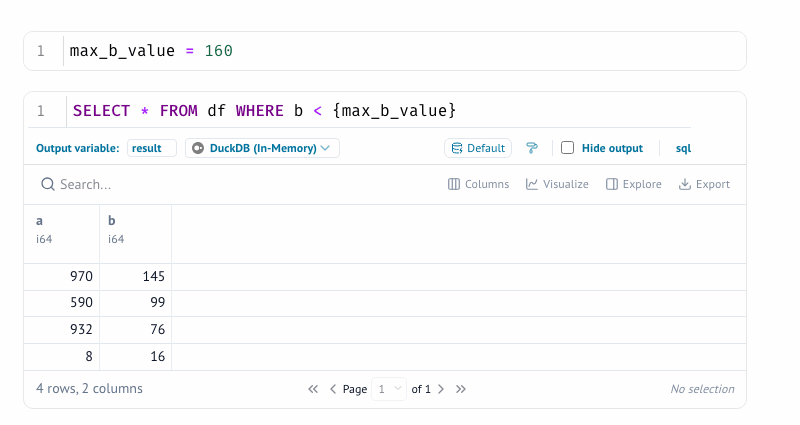
It is also suited to data workflows that benefit from direct manipulation and explanation. Official documentation describes interactive controls such as sliders, dropdowns, tables, plots, and dataframe tools, along with native SQL cells that can query dataframes and supported databases. Marimo can serve a notebook as an interactive web app, export or run it in browser-oriented modes, and execute it as a script. Those capabilities make it relevant for prototypes, reproducible analyses, internal tools, teaching materials, and lightweight data applications.
Teams should choose it when reactive execution and a Git-friendly artifact matter more than strict compatibility with an existing Jupyter-only workflow. Marimo documents a Jupyter conversion command, but any migration should still be tested against the original notebook’s dependencies, widgets, and execution assumptions.
Alternatives
The closest established alternative is Jupyter, which provides open software and web services for interactive computing across many languages, including the classic Notebook and JupyterLab interfaces. Streamlit is an adjacent option for turning Python scripts into shareable data apps, particularly when the primary deliverable is an app rather than a notebook. Observable is another adjacent option for computational, collaborative documents focused on analysis, visualization, explanations, and data apps. These comparisons are based on the products’ official descriptions, not on claims that they have identical execution models.
Pricing
The official Marimo documentation states that the project is free, and it is presented as open source. The official GitHub repository identifies the project license as Apache-2.0. The official sources consulted do not specify a separate paid tier, seat-based price, hosted-service price, or enterprise contract for every Marimo-related service. Review the current project and service terms before making a procurement or deployment decision. Marimo also offers molab, described by the official site as a free online notebook entry point; this draft does not infer that every hosted capability has the same terms as the open-source package.
FAQs
1. What is Marimo’s main difference from a traditional notebook?
Marimo uses reactive execution. When a cell changes, dependent cells can run automatically, and deleting a cell removes its variables from program memory. Its notebooks are stored as pure Python rather than a JSON document, which supports ordinary source control and reuse.
2. Can Marimo notebooks run outside the editor?
Yes. Official documentation says a notebook can be executed as a Python script and served as a web app. The marimo run your_notebook.py command serves an app, while python your_notebook.py executes the notebook as a script.
3. Does Marimo support SQL and interactive data work?
Yes. Marimo documents native SQL cells and integrations for dataframes and several database or data backends. It also provides interactive elements such as sliders, dropdowns, dataframe tables, and selectable plots. The exact backend behavior depends on the installed packages and the data source.
4. How do I install Marimo?
The official quick start documents installation with pip, uv, or conda. A basic pip path is pip install marimo, followed by marimo tutorial intro. The documentation also describes an optional marimo[recommended] extra for additional capabilities.
5. Can an existing Jupyter notebook be moved to Marimo?
Marimo’s official documentation provides a conversion command: marimo convert your_notebook.ipynb > your_notebook.py. Conversion is not a guarantee that every extension, widget, dependency, or execution detail will behave identically, so the resulting notebook should be reviewed and tested.