Overview
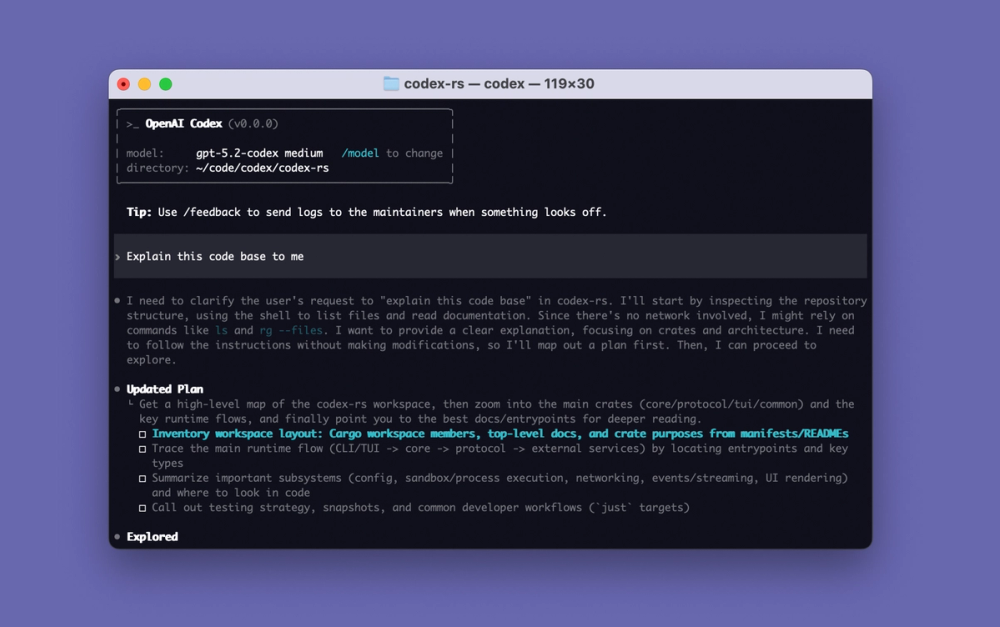
OpenAI Codex CLI is a coding agent that runs in a developer’s terminal and works with the repository in the current directory. It can inspect files, propose or make code changes, run commands and tests, and explain its work. Its local workflow is aimed at engineers who want an agent close to their existing project, shell, editor, and version-control habits rather than a separate hosted IDE. The official CLI documentation also describes scripting and automation use through codex exec (Codex CLI guide, official repository).
Codex CLI is open source under Apache-2.0. The command-line client executes on the user’s machine, while model access is supplied through OpenAI account sign-in or an API key. Local execution therefore should not be confused with running an OpenAI model on local hardware: the official material reviewed documents using Codex with OpenAI model access, not self-hosting OpenAI’s models. The repository is active; its releases page lists stable v0.167.2 on November 11, 2026, followed by a v0.170.0 alpha on November 12 (release history).
Key Features
Codex can examine a project, change files, and run terminal commands under a configurable permission and sandbox model. The official security documentation says local execution is sandboxed, network access is disabled by default, and write access is normally constrained to the selected workspace. Approval controls govern actions beyond those boundaries, such as accessing other directories or enabling network use (security and approvals). This offers a way to grant an agent useful project access without treating every command as automatically trusted.
The CLI supports interactive coding sessions as well as non-interactive automation using codex exec, which can be used from scripts and CI jobs. The official feature and CLI pages also document skills, MCP connections, image input, code review, web search, and subagents. These capabilities let a developer package reusable instructions, connect selected external tools, ask for changes based on a visual reference, or delegate bounded work. Exact tools and models available can depend on the Codex version, account, configuration, and rollout status (CLI guide, Codex repository).
Use Cases
Codex CLI is useful for exploring an unfamiliar codebase, implementing a scoped feature, investigating a bug, editing tests, running checks, or producing a reviewable patch from a terminal session. It can also support repeatable repository tasks in a CI pipeline through codex exec, provided the workflow is configured with suitable credentials and sandbox permissions. The security controls make it relevant where the team wants to limit a coding agent to one workspace and require approval before network or out-of-workspace actions. It is not a substitute for reviewing generated changes, running a project’s own tests, or protecting credentials that a command can access.
Best for
Codex CLI is best for developers who already work in a terminal and want an AI coding agent to inspect and modify a real local repository. It is a particularly good fit for individual code changes, codebase exploration, repeatable engineering tasks, and supervised command execution. Teams that need fully offline inference or an entirely self-hosted model stack should look elsewhere: the reviewed OpenAI sources describe local CLI execution but do not document a self-hosted Codex model service.
Alternatives
Cursor is an AI-first editor for developers who prefer an integrated graphical IDE and editor-based agent workflow over a terminal-centered tool. GitHub Copilot is a broader coding assistant and agent option for teams that want GitHub-connected repository, issue, and pull-request workflows. OpenCode is an open-source terminal coding agent for users who want a comparable command-line workflow with a different provider and model configuration approach.
Pricing
Codex CLI is open-source Apache-2.0 software, with no separate command-line application price documented in the official sources reviewed. Codex access is included across ChatGPT plans, including Free and Go, but usage limits vary by plan; the official Help page says cloud Codex is not included in Free or Go. API-key use is a separate setup and usage-billing path. The reviewed official pages do not state one universal current dollar price or an exact per-plan Codex quota, so users should check the current ChatGPT plan and Codex account surfaces before budgeting (Codex in ChatGPT plans, CLI guide).
Frequently Asked Questions
1. What does Codex CLI do?
It is a terminal coding agent that can inspect a repository, edit code, run commands, and help with software-development tasks. It operates in a local project workflow, with permissions and model access configured by the user.
2. Does Codex CLI run the AI model on my computer?
The command-line client runs locally, but the official sources reviewed describe OpenAI account or API access for model use. They do not document a self-hosted OpenAI model or a fully offline inference mode. Local code execution is not the same as local model inference.
3. What limits does the free Codex access have?
The official Help page says Codex is included on Free and Go plans, but limits vary by plan. It also says Codex cloud is not available on Free or Go. Exact current message, task, and rate limits are not specified in the sources reviewed and may change with the account plan.
4. How does Codex limit risky actions?
The official security guide describes sandboxed local execution, workspace-scoped write access by default, network access disabled by default, and approval controls for actions outside those defaults. Users should review the active configuration and approve only actions they understand.
5. Is Codex CLI open source, and can I automate it?
The official GitHub repository uses the Apache-2.0 license. The CLI guide documents codex exec for non-interactive scripting and CI workflows. Automation still requires a suitable account or API setup, secure credential handling, and explicit choices about sandbox and approval behavior.